
Improving your flexographic prepress workflow doesn’t have to mean costly investments in proprietary systems or overwhelming technology upgrades. With practical, economical steps and the right tools, you can significantly boost throughput, reduce labor, and enhance plate quality, setting your operation up for consistent, high-quality results.
Economical Improvements to Your Flexographic Prepress Workflow
The flexo prepress landscape is evolving rapidly, with new technologies promising greater integration and automation. However, many of these solutions can be expensive and complex, especially for smaller shops. The good news is that you don’t need to overhaul your entire system to see meaningful improvements.
Focus on identifying key touchpoints in your flexographic prepress workflow that impact throughput the most. For example, manual trapping of individual objects in artwork can consume over 20% of an operator’s time. While in-RIP trapping is common in commercial printing, it often falls short in flexo due to the need for individual object control.
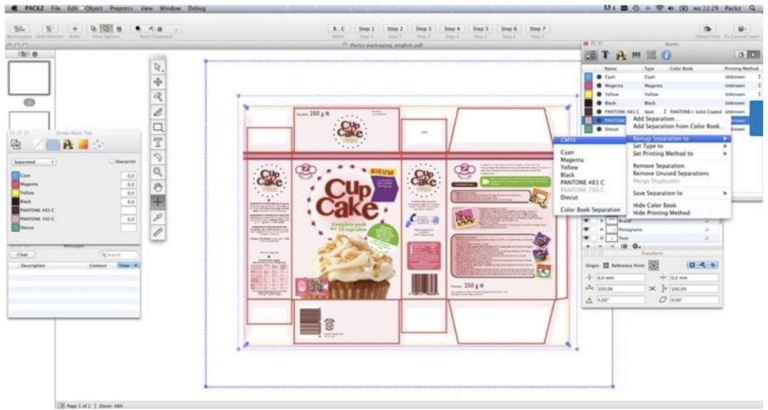
One cost-effective solution is to use plug-ins for Adobe Illustrator that add flexo-specific functions such as vector-based trapping, automated step-and-repeat, dynamic bleed control, nesting, and ink remapping. Since many prepress operators are already familiar with Illustrator, these plug-ins can reduce the learning curve and improve productivity.
Similarly, adopting an open prepress concept—where your RIP and workflow software are chosen based on compatibility and budget rather than vendor lock-in—can provide flexibility and cost savings. This approach also supports integrating traditional and digital devices, which is especially important if you plan to transition some work to digital presses.
Key Tools to Enhance Your Flexographic Prepress Workflow
Beyond software improvements, implementing quality control checkpoints and measurement tools in the plate room can dramatically improve your flexographic prepress workflow and final print quality.
Measuring the Imaged Plate
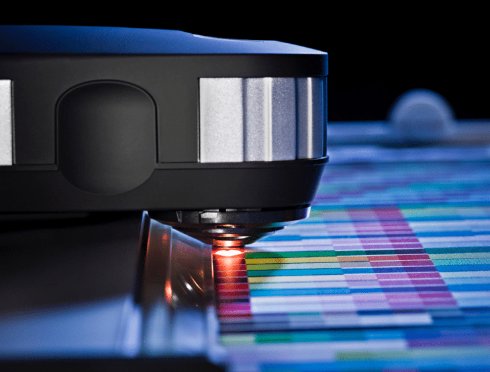
Ensuring your plates are imaged correctly is fundamental. Using a transmission densitometer, such as the Techkon Dens, allows you to measure the laser engraving on plates without damaging them. This device combines densitometry and microscopy functions to verify that the laser removes the correct amount of the black Laser Ablation Mask (LAM) layer, helping maintain consistent plate quality.
Imaging control strips on each plate provides a standardized way to measure and document plate quality, reducing troubleshooting time and improving process understanding.
For shops seeking automation, devices like the Beta Flex Pro Flex Plate Analyzer, combined with FlexEye Plus software, can measure dot sizes and relief depth while saving data for analysis, streamlining the QC process.
Documenting Plate Relief
Consistent plate relief is critical for print quality. Digital plate micrometers can measure plate thickness and floor depth at multiple points, ensuring your platemaking equipment is exposing and processing material properly. Available in various sizes, these micrometers provide reliable, repeatable measurements that support quality control.
We offer both analog and digital versions of our plate bench micrometers, allowing you to choose the style that best suits your preferences.
- The analog model features a classic circular dial with a hand/needle indicator.
- The digital model operates on battery power and provides measurements in either millimeters or inches.
Plate micrometers are essential tools for measuring plate thickness and floor depth at multiple points, helping ensure your platemaking equipment is properly exposing and processing materials. Importantly, you don’t need to use the digital version—either type will give you accurate results.
The importance of a plate micrometer cannot be overstated. It is indispensable for gauging raw and finished plate materials, checking dried plates before finishing, and performing quality assurance prior to plate mounting.
Maintaining Proper Lamp Intensity
Lamp intensity directly affects plate exposure quality. Measuring UV-A lamp output at multiple points across the exposure bed ensures consistent exposure and prevents defects caused by low-intensity lamps. Regular monitoring and timely lamp replacement help maintain plate integrity and reduce waste.
Remember, lamp life depends on operational factors like temperature and usage cycles, so documenting intensity weekly is a best practice for maintaining your flexographic prepress workflow.
Putting It All Together: Benefits of an Optimized Flexographic Prepress Workflow
By focusing on these economical improvements and essential software, you can reduce operator time by 25-30%, improve plate quality, and minimize downtime. These gains translate into faster turnaround, lower costs, and higher customer satisfaction.
Whether you’re upgrading software, integrating new devices, or implementing quality control checkpoints, a well-planned flexographic prepress workflow can make a significant difference in your operation’s efficiency and profitability.
Ready to optimize your flexographic prepress workflow and elevate your print quality? Start by evaluating your current process, identifying key areas for improvement, and investing in the right tools to support your team’s success.